Geographic Mapping of Ping or Traceroute
This project was a derivation of a much older project that was abandon.
The idea of the project was to show network problems between customers and data centers.
Essentially, it would run pings and traceroutes from multiple monitoring locations, to the other
locations, and to the root nameservers. An array of pings and traces to enough properly selected
points would show if there were network problems, and either provide a resource to file repair requests,
or give a valid reason for slow performance to customers.
This version was written for Auction Management Solutions,
but it was never completed due to the need for staff to maintain it.
Routers were attempted to be geolocated based on their hostnames, and as an alternative located with GeoIP. This
proved to be fairly successful, but approximately 10% of the routers encountered did not reverse resolve to a hostname, did not
show a public IP at all (such as 10.0.0.0/8 or 192.168.0.0/16), or simply were named vaguely and did not resolve correctly with GeoIP.
in such cases, an evaluation of where the surrounding hops showed up, and other intersection hops, would usually provide enough information
to show at least the city, which is the granularity that we were looking for.
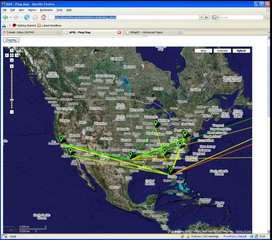
The results were color coded based on latency and packet loss. Green is good. Yellow is fair. Orange is poor. Red is unacceptable or down.
For ping tests, the lines go directly from the source to the destination. For traceroutes, each line indicates the performance on that hop only.
Over approximately 2 months of operation, over 2,000 routers were encountered in several countries. Since these tests only ran against servers
in the United States, plus the root nameservers, international routes were limited.
Tests were performed once every 5 minutes, and recorded in a MySQL database for evaluation
to be displayed using Google Maps.
There were three classification of monitoring stations. Source-only, Source/Destination, and Destination-only.
- Source-only would be stations such as home computers, or machines behind NAT's, which could be reached from outside,
but could send in their reports.
- Destination-only would be stations that we had no control over, but we wished to monitor, such as root nameservers, important sites,
or customer sites where they didn't have equipment that we could use for Source/Destination.
- Source/Destination would be monitoring sites that could do the tests, plus be destinations.
A sample of the results are show here.
This is a sample of the ping tests. As you can see, most of the ping performance was good.
There was a performance problem between Atlanta, GA and Dallas, TX at the time this was shown.
That was insignificant for the company, as the Dallas, TX point was a 3rd party site, not related
to the company.
You can see there was also some poor performance towards Europe. The real map was scrollable,
so you would be able to see the destination was a root nameserver, and Trans-Atlantic routes
are sometimes poor, and this is expected.
The following map is the traceroute map. This particular one is showing from all sources to all destinations,
which makes for a very complex map. It's nice to look at to see everything is good, but you'd need to
zoom in and click on a destination, to find what route isn't working, and then change your source/destination viewing
to show only the problem area.
During this test, everything was good. There are some errors with this map, such as the hops that show up in Iowa, Denver, and Miami, FL.
These hops are what I described above as being poor automatic guesses, which would need to be resolved.
- The Denver, CO points were usually Level3 Communications, with hops we hadn't written rules for to guess by hostname yet.
- The Miami, FL points were another provider, I believe AT&T or Cable&Wireless, who didn't give very good hostnames, and GeoIP always identified at Miami.
- The Iowa and Missouri hops were points where the provider didn't give a good hostname, and GeoIP was only able to identify "United States", which
they centered there.